Every client who checks in is handing you an opening. What separates a client check-in workflow that builds the relationship from one that quietly becomes a form nobody reads is what you do in the minute after: read it, react, and often write back the same day. That response loop, not the check-in itself, is the habit worth building.
The good news is that the loop is cheap. A reaction and a short reply cost you under a minute per client, and they tell your client a person is actually on the other end. The client check-ins feature page covers what the check-in itself looks like and how it rolls up across your roster; this guide is the reply half of the loop, the part your client actually feels.
Coaches who keep this up tend to fold it into the start or end of their day, alongside messages, rather than saving it for a weekly catch-up. Grove Home makes the finish line explicit: work the queue until the momentum bar reads All clear, and you’re done for the day. This rhythm also lines up with how the coaching field talks about follow-up and accountability; see how this response loop supports NBHWC best practices below.
The terms you’ll see
| Term | What it means |
|---|---|
| Check-in | The client’s own daily log: how they’re feeling, any habits they marked done, and an optional note. Submitted once per client per calendar day, in their own timezone. |
| Reaction | A one-click emoji response to a check-in, picked from Grove’s eight-emoji set. One reaction per check-in; you can swap it, but not remove it. |
| Waiting on you | The badge on a client whose check-in or direct message hasn’t had a response yet. |
| Momentum bar | The progress track at the top of Grove Home’s triage list, counting how many of today’s items you’ve handled and estimating the minutes left to a clear board. |
| All clear | What the momentum bar reads once every waiting item for the day has a reaction, a reply, or is marked handled. |
| Tend | The button on a roster row that opens a client’s next unhandled check-in or message. |
| Handled externally | Marks a check-in done without emailing the client, for when you already replied by text, call, or in person. |
Before you start
- Have at least one active client whose first check-in has already landed. If you haven’t onboarded anyone yet, do Invite and onboard your first client first; its last step is this same response loop.
- Run this from Grove Home, the screen you land on when you sign in. Once you’re coaching a few active clients, the triage list is the first thing on it. A full pass across a small roster usually takes ten to fifteen minutes.
- You don’t need to sort check-ins into “needs a reaction” versus “needs a message” ahead of time. Grove surfaces who’s waiting and you decide in the moment.
Steps
-
Find who’s waiting on you. Grove Home greets you with a one-line read on the day (who’s waiting, who’s on track), and its triage list opens with a Start here hero, the single client Grove ranks as most time-sensitive today, with the rest of your roster listed beneath it. A client with an unanswered check-in carries a Waiting on you badge; the hero’s button reads Send a reply, and each roster row has a Tend button. The momentum bar at the top counts your progress (“2 of 5 handled”) and estimates the minutes left to a clear board, so you always know how much is waiting without scrolling.
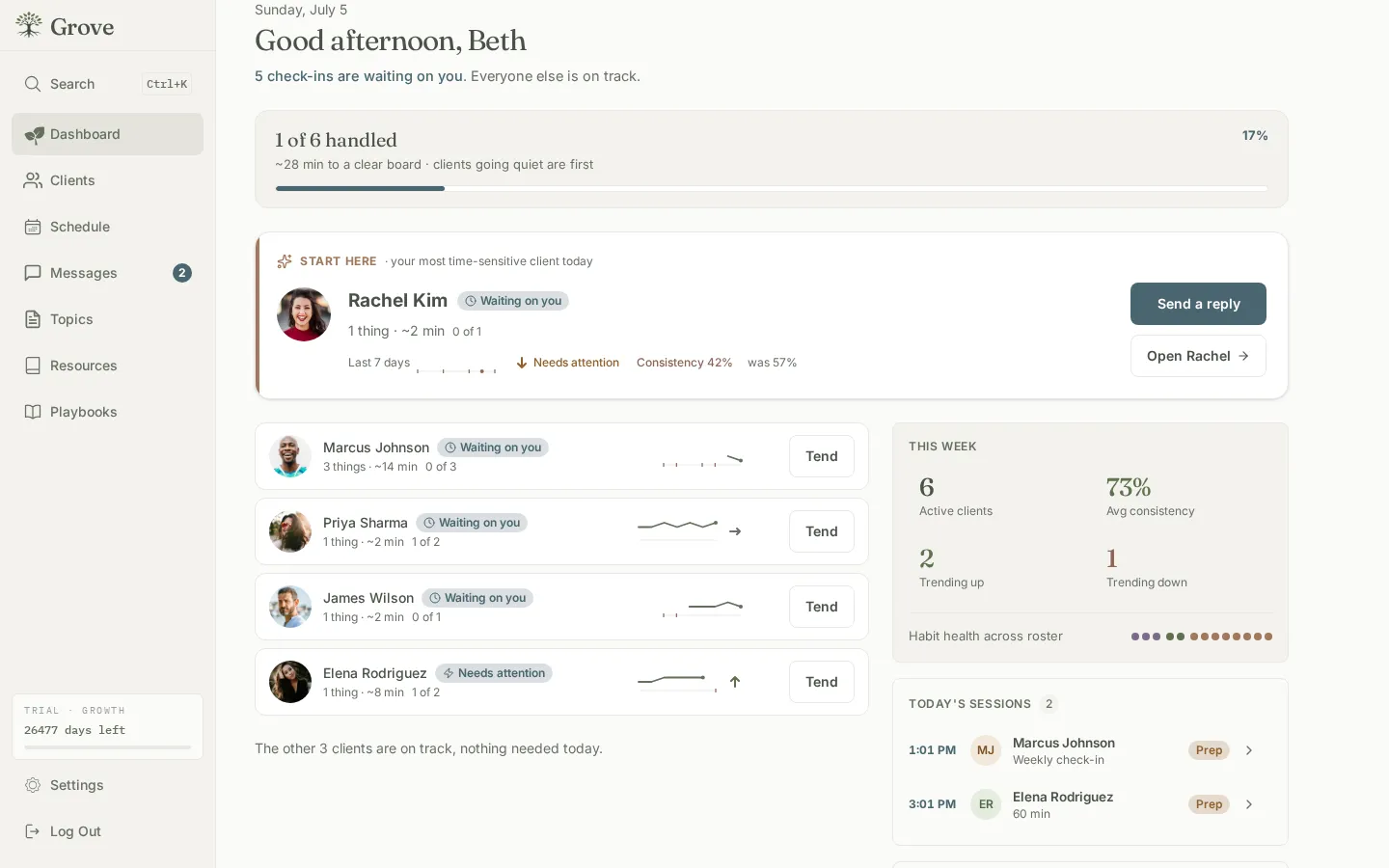
Heads up: Check-ins are counted by the client’s own local date, not yours. Something they submitted late last night in their timezone can already read as “yesterday” on your board well before it’s tomorrow where you are. See how timezones affect check-ins.
-
Open the check-in. Click Send a reply on the hero, or Tend on a roster row. Grove opens the check-in in a drawer right over Grove Home, showing how the client is feeling, any habits they logged, and their note if they left one. You never lose your place in the queue.
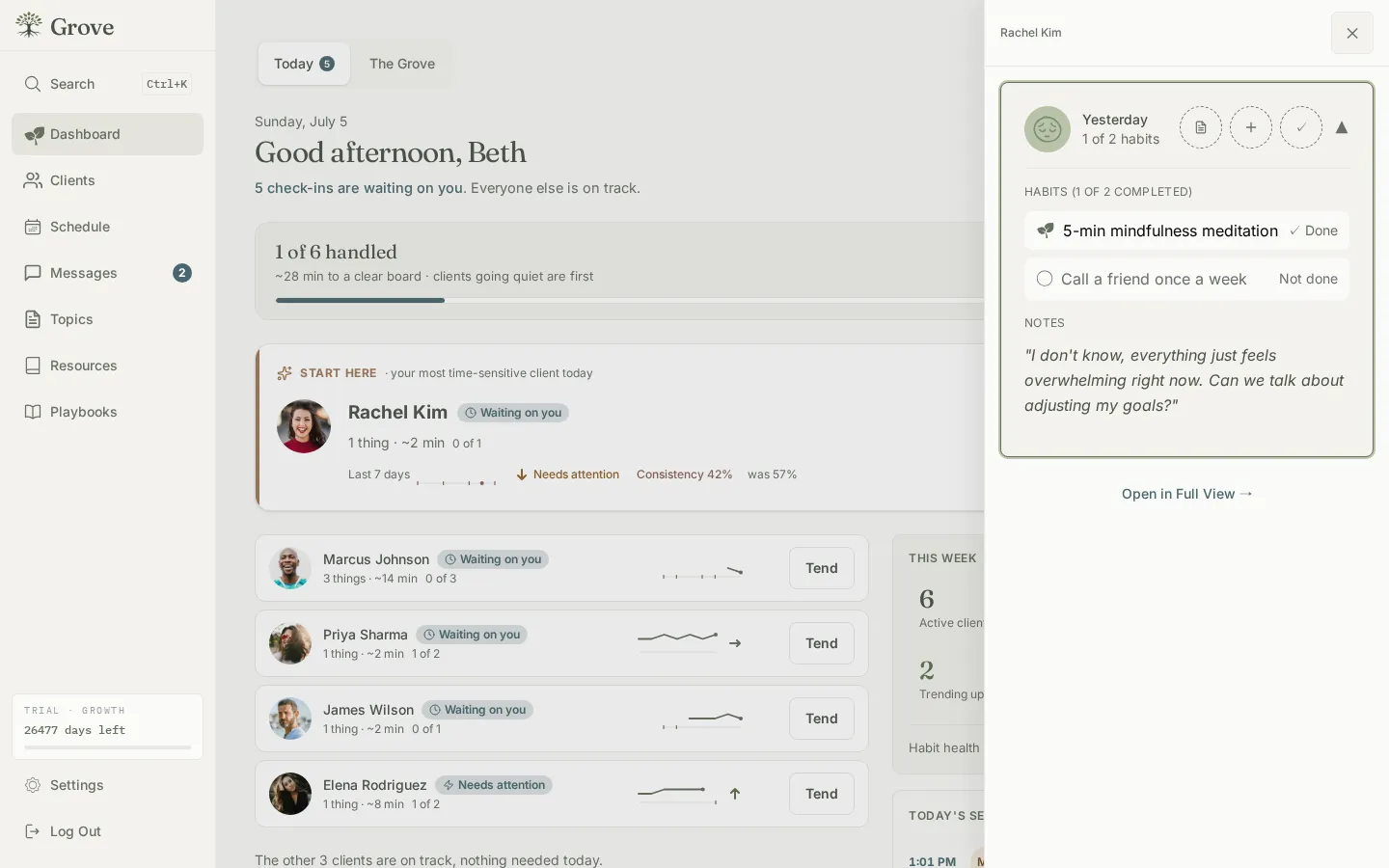
Heads up: the Waiting on you badge also covers unread direct messages, so Tend occasionally opens a message thread instead of a check-in. Reply there the same way, then keep moving.
-
React with an emoji. Click the reaction button on the check-in and pick from Grove’s curated set: You got this!, Celebrate!, Sending love, and five more. The reaction sends the instant you click it, no separate confirm step, and your client gets an email with the emoji and your name.
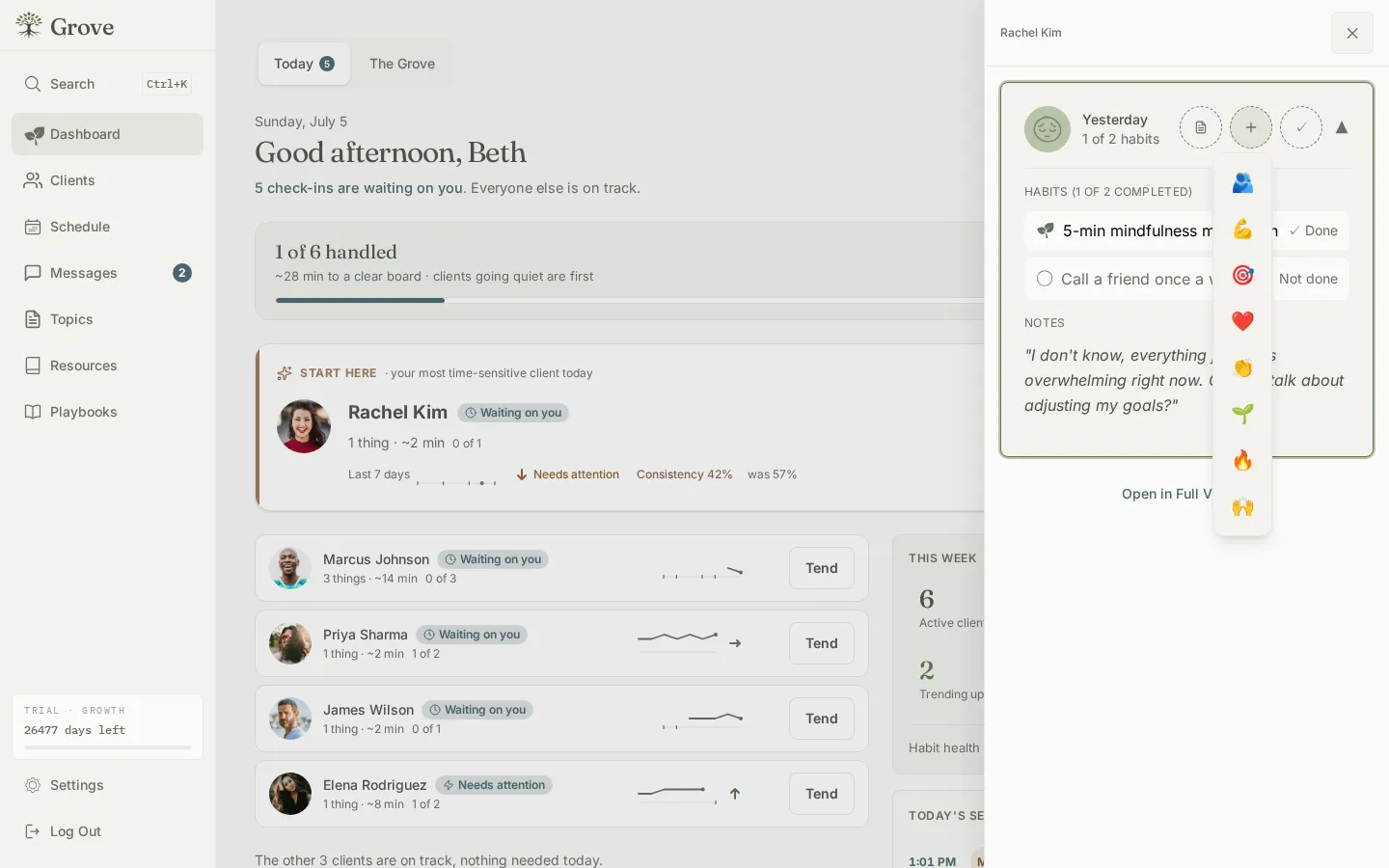
Gotcha: each check-in gets exactly one reaction. You can swap it for a different emoji any time, but you can’t remove it once it’s set. See the reactions FAQ.
-
Add a message if you want to say more. Once a check-in has a reaction, a message thread opens underneath it. Type a line and click Send; your reply lands in your client’s check-in history right alongside the entry it responds to, so the exchange reads as one conversation.
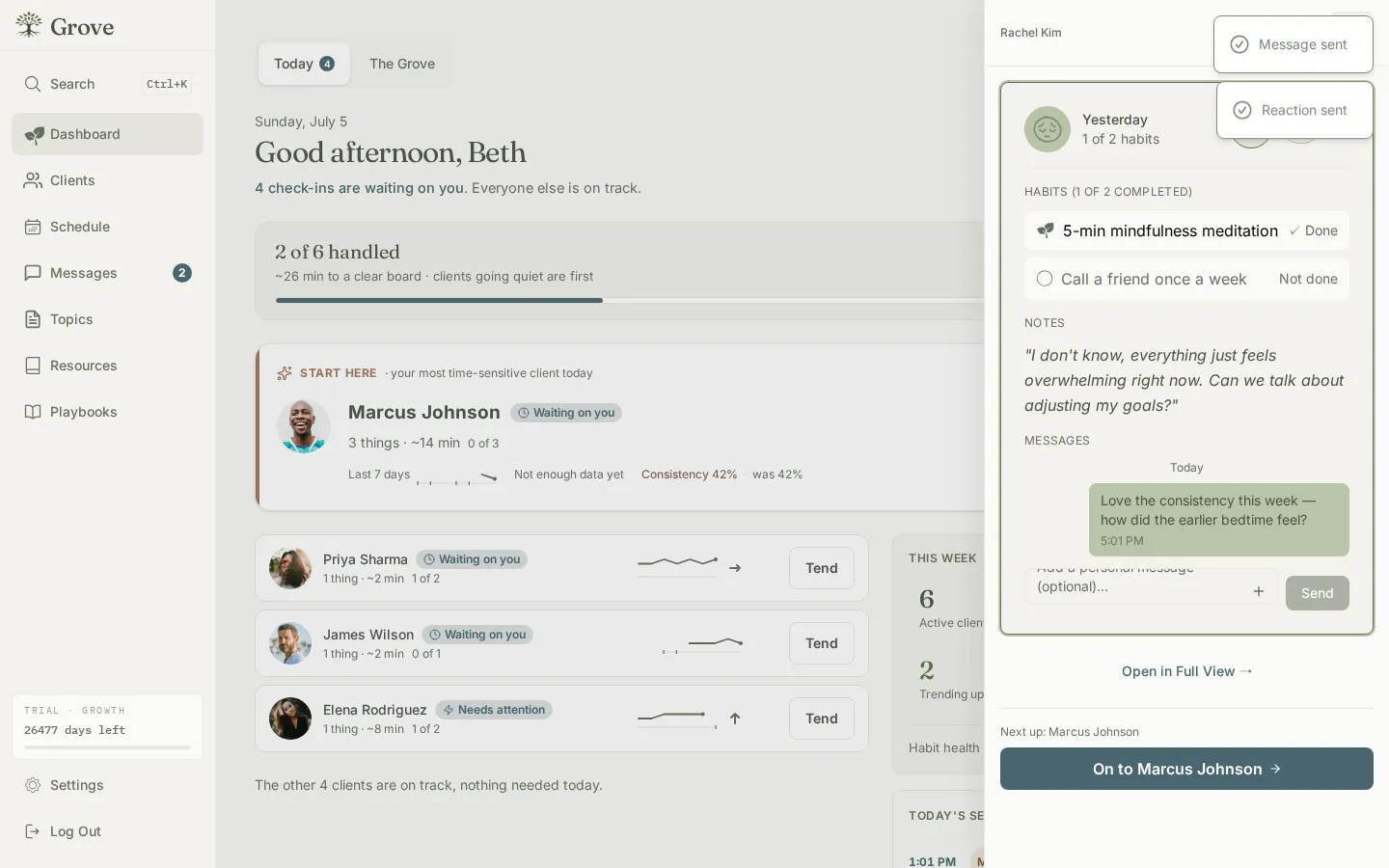
Gotcha: react and message the same check-in and Grove bundles both into a single email instead of two separate notifications, so reacting first and writing a sentence after doesn’t spam your client. See does my client get notified?
-
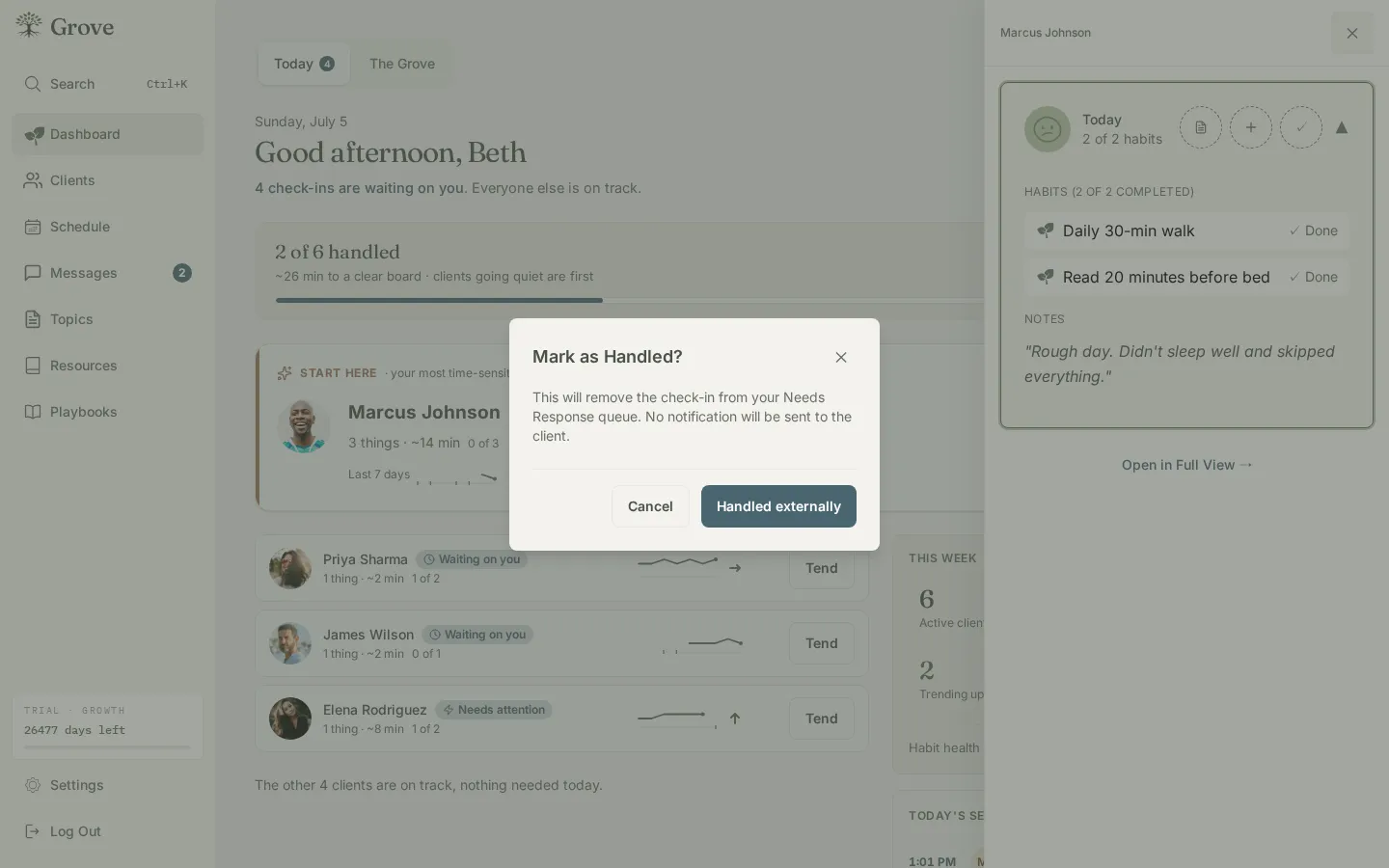
Already replied outside Grove? If you texted or called your client instead, click Handled externally next to the reaction picker and confirm in the Mark as Handled? dialog. This clears the check-in from your waiting list without emailing your client anything, since you’ve already closed the loop yourself.
-
Move to the next client. After you react, message, or mark a check-in handled, a footer appears naming the next waiting client (On to the next, or On to followed by their name) so you can advance straight through everyone waiting without going back to Grove Home between clients. When the queue is empty, the momentum bar flips to All clear. That’s your stopping point.
-
Make it a rhythm, not a one-off. Same-day reactions and short replies are what keep a client’s daily check-in feeling like a conversation with you instead of a survey, which is the whole habit this guide is building. See “Checking in is not checking up” for why Grove designs the loop this way rather than around weekly recap reports.
Gotcha: clients get one check-in per calendar day and can backfill up to 14 days if they miss some, so don’t be surprised by a short cluster of “new” check-ins appearing at once after a quiet stretch. See can a client check in more than once a day?
How this response loop supports NBHWC best practices
Responsiveness between sessions is not a soft nicety; it shows up as named competencies in the NBHWC Content Outline (2026-2030). The loop in this guide is built so that keeping up with it means practicing those standards on the days you don’t have a session at all.
-
Presence isn’t confined to the call (1.1, 1.3). Domain 1 grounds coach presence and the growth-enhancing relationship in showing up for a client consistently, not only for the time you’re on a call together. A same-day reaction and reply is that presence practiced between sessions, where a client otherwise hears nothing from you for a week or two.
-
Follow-up sessions open with momentum, not reconstruction (1.6). Domain 1’s follow-up-session competencies start with reconnecting and reviewing what’s happened since you last talked. A coach who has already read and responded to a week of check-ins walks into that session already knowing the client’s week, instead of asking them to recap it live.
-
The client owns the log; you own the response (3.9.7). The outline calls for a client’s own methods of accountability and progress tracking, moving toward self-management. The check-in is the client’s record, submitted on their own schedule; this guide’s whole job is the reactive half, read it, react, sometimes reply, never rewrite what they logged.
None of this makes the reaction or the reply do the coaching for you. It supports the version of between-session presence the field already asks for, at a cost of under a minute per client.
What’s next
Once responding is a habit, the next lever is what you walk into your next session already knowing: see Show up prepared: session prep with Sage for how Grove turns the check-ins, habits, and notes you’ve been reacting to into a briefing, suggested moves, and a built agenda before you ever open your notebook.