Inviting a client to Grove isn’t just sending an email. Grove gives you a draft space where you can prepare everything before your client ever sees it: their intake, their first habits, even their first session plan. Then the invite goes out, your client walks through onboarding on their own time, and their first check-in lands on Grove Home ready to talk about.
This guide walks the whole arc: adding the client, preparing their space, sending the invite, and what to do when that first check-in arrives. If you haven’t run Grove on yourself yet, do Get set up and coach yourself first before this one. Everything below will feel familiar because you’ll have lived the client’s side of it. Because this arc is where the coaching relationship actually begins, there’s a section at the end mapping it to the NBHWC Content Outline.
The terms you’ll see
Onboarding has its own small vocabulary, mostly the client statuses you’ll watch change over the course of this guide. Here’s the map:
| Term | What it means |
|---|---|
| Draft | A client’s status from the moment you add them until you send their invite. Nothing is visible to them yet; it’s your private space to prepare. |
| Getting ready checklist | The “Getting ready for [client]” checklist Grove shows on a Draft client: collect intake data, set goals, add habits, add actions, schedule their first session, prepare for that session, and send the invite. |
| Invited | A client’s status once you send the invite (or generate a link) and before they accept it. |
| Active | A client’s status once they accept the invite and sign up. They join your main client list at this point. |
| Onboarding | The Clients page section (“Clients you’re preparing to work with”) that tracks every client between Draft and Active. |
| Needs follow-up | The flag Grove adds in the Onboarding section when an invite has gone quiet and a personal nudge from you would help. |
| Needs water today | The list beside your grove on Grove Home naming the clients waiting on a response from you, including a client’s first (and every) unanswered check-in. |
Before you start
- Have your client’s email address and their time zone. Time zone matters more than it looks: check-ins count by the client’s local date.
- Decide what intake questions you want answered. You can build an intake form in Grove or enter intake data yourself.
- Budget ten minutes for your side. Your client’s side is asynchronous, and most complete it within a couple of days.
Steps
-
Add the client. On the Clients page, click Add Client and enter their first name, last name (optional), email, and time zone. They’re created in Draft status, which means nothing has been sent yet. You now have a private space to prepare.
Gotcha: Pick the client’s own time zone, not yours. Check-ins are counted by the client’s local date, and that’s how they’ll be labeled on your dashboard. See how timezones affect check-ins.
Tip: Bringing an existing roster from another system? Click Import Clients on the Clients page instead and upload a CSV. A column mapper matches your spreadsheet’s columns to Grove’s fields, and everyone lands as a Draft, ready for the same preparation below. See Import your existing client roster for the full walkthrough.
-
Prepare their space while they’re still a Draft. Open the new client and Grove shows a “Getting ready” checklist: collect intake data, set goals, add habits, add actions, schedule their first session, prepare for that session, and send the invite. None of it is visible to the client yet; they see everything you’ve set up the moment they accept. Each piece earns its place: goals and habits mean their first check-in has substance instead of a blank slate, and a scheduled first session gives their first week a landmark and switches on session prep for you.
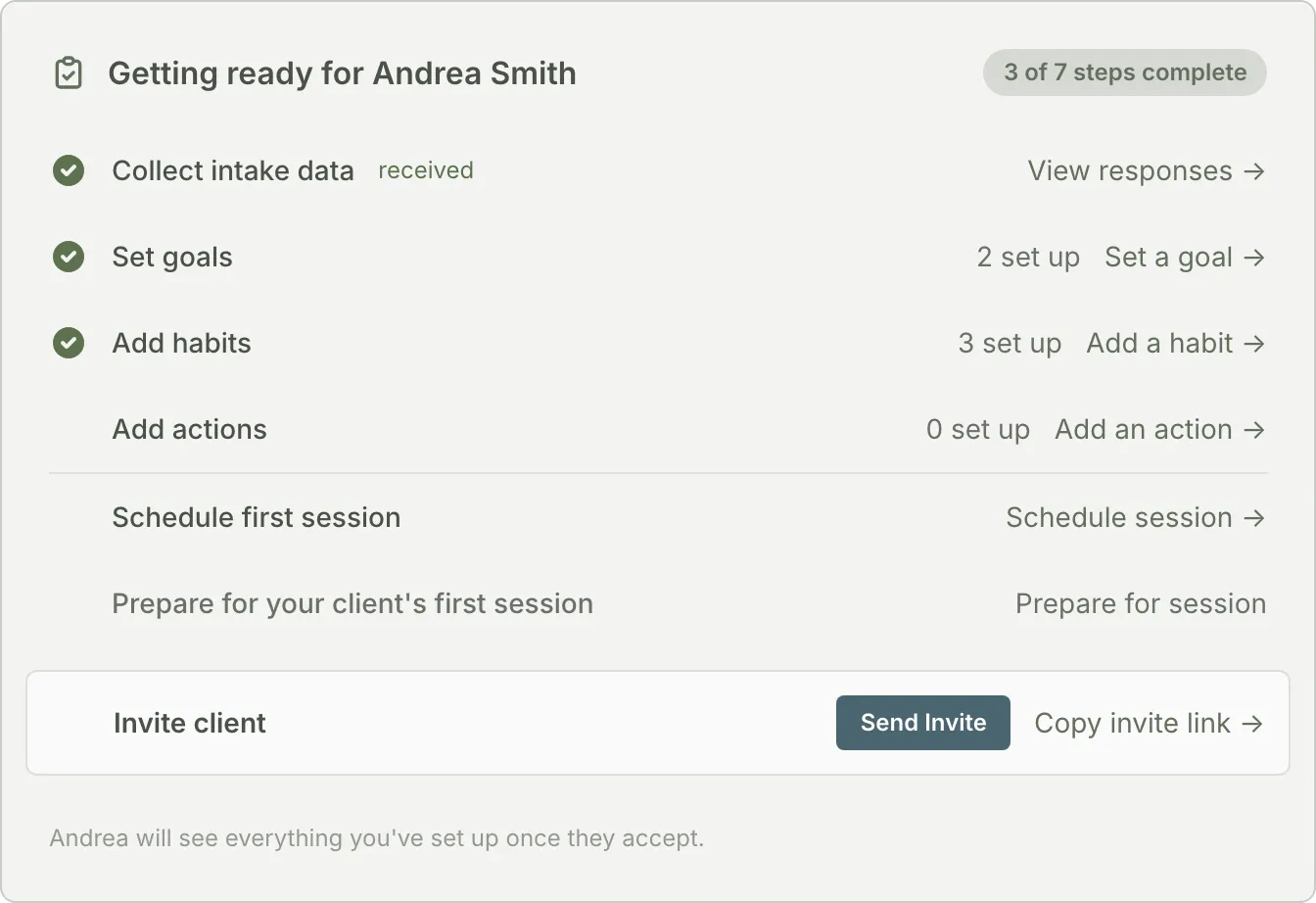
Tip: Keep it client-led. Seed only what you’ve already agreed on together in your intro conversation, and hold the rest for your first session. Your client also picks their own outcome areas and goals during sign-up (the same picker you met when coaching yourself), so what you prepare here is the structure around their choices, not a substitute for them. See can I pre-fill their first goal or habit?
-
Collect intake data. From the checklist, choose Set up intake form, then Send intake form (or Copy intake link) so your client can complete it in Grove. The form itself is yours to shape: under Settings, Manage Forms lets you start from the Health Coaching template or Create Blank Form and build from a library of suggested questions (profile, medical, goals, nutrition, movement, stress and sleep). If you’d rather enter their information yourself from an earlier conversation, Grove first asks you to confirm you have the client’s consent to store their data, then click Start Intake.
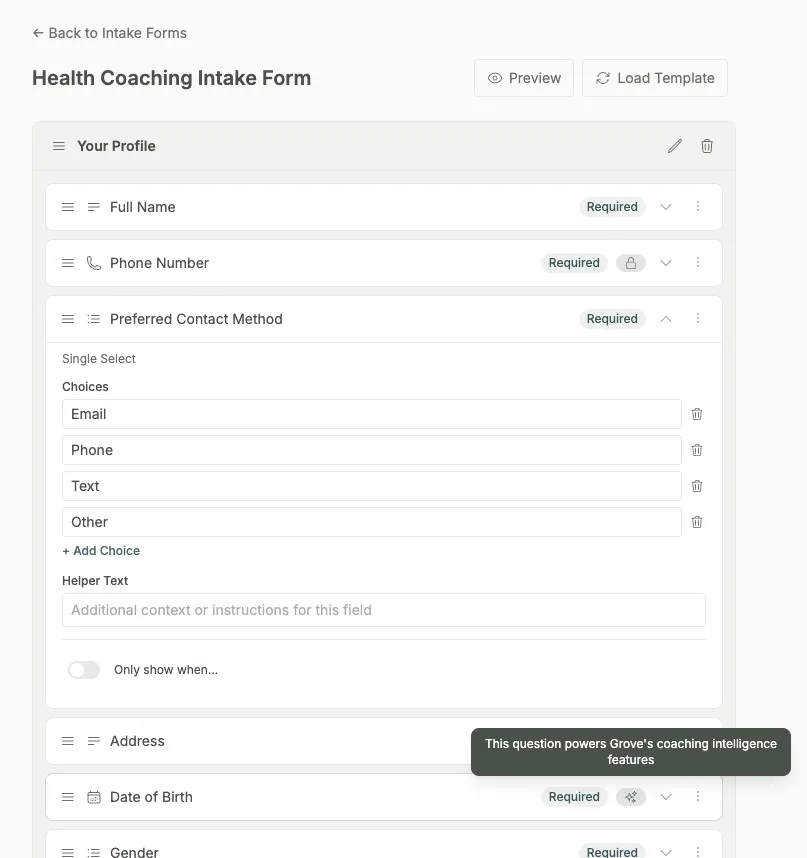
Tip: Intake answers don’t just sit in a file. They surface in session prep, so the work you do here shows up again right before your first session. See Set up intake forms (and put the answers to work) for the full walkthrough of building the form and putting the answers to work.
-
Send the invite. Click Send Invite. Grove confirms who the email is going to and notes that the link expires in 7 days, then moves the client to Invited status. Prefer to deliver it yourself over text or another channel? Choose Copy invite link instead and share it directly.
Gotcha: Each client can have only one live invite link. Resending generates a fresh link and the old one stops working, and there’s a short cooldown between resends. Fixing a typo in their email cancels the invite entirely and returns them to Draft, so you’ll need to send a new one. See resending invites.
-
Track them in the Onboarding section of the Clients page. While you wait, the Clients page’s Onboarding section (“Clients you’re preparing to work with”) shows how long ago each invite went out and flags anyone who Needs follow-up. Grove also nudges the client automatically with reminder emails at 48 hours and 7 days. If they stall past that, a short personal message from you usually breaks the log-jam.
Heads up: A new client not appearing in your main client list is expected, not a bug. They join it when they become Active. See why doesn’t my new client show up?
-
Your client accepts and onboards. They open the invite email, create their account, and land in a short guided welcome built around you: your name and a note from you come first, with a promise that it takes about a minute and they can stop any time. The flow starts with the practical bits: confirming their name and timezone, how the daily check-in works, when to be reminded, where things live, and a plain screen showing exactly what you can see. Then Grove asks for their why in three questions, “Who do you want to be?”, “What would feel different?”, and “What would you like to work on?” (drawn from the same outcome library you met while coaching yourself). Every question is skippable, nothing is graded, and their answers are waiting for you before your first session. The flow closes by introducing Sage with a real yes-or-no choice (when your practice has AI on) and their first check-in, done right inside the flow, with whatever habits you prepared waiting for them. Their status flips to Active the moment they sign up. On iPhone they can run all of it, and every day after, in the Grove client app from the App Store.
-
Watch for the first check-in. The client’s onboarding progress tracker moves through Invitation sent, Accepted invite, and First check-in, and their briefing card starts filling in with streaks and feeling trends within the first few days. Many coaches schedule the first session for right after the first check-in lands, so the conversation starts from real data.
-
Respond to the first check-in. It lands on Grove Home: the focus line under your greeting counts the check-in waiting on you, and your client appears in the Needs water today list beside your grove. Open their row to see the check-in, react with an emoji, and send a short message (“I saw your first check-in, great start”). That first response sets the tone: check-ins are a dialogue with you, not a form that disappears into a database.
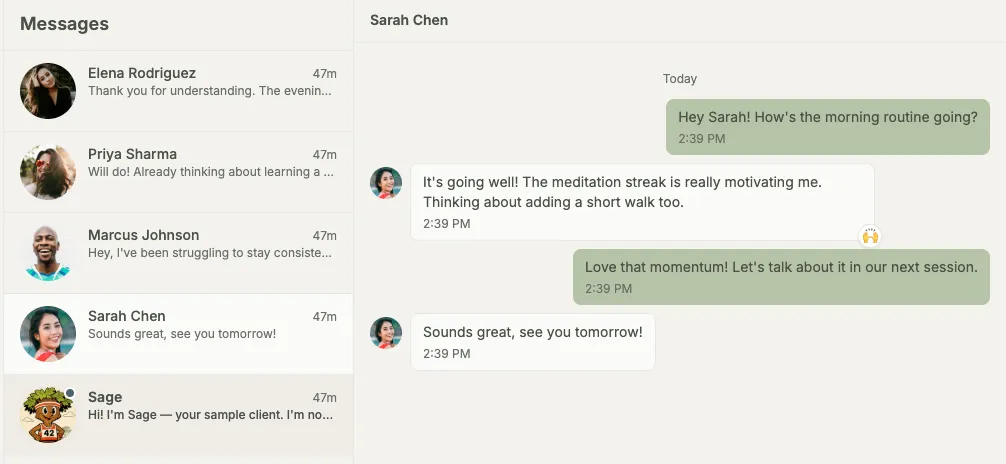
Tip: A reaction and a message on the same check-in are bundled into a single email to your client, so reacting first and writing a sentence after doesn’t spam them.
How inviting and onboarding a client supports NBHWC best practices
Onboarding isn’t just account setup; it’s where the coaching relationship actually starts, and the NBHWC Content Outline (2026-2030) treats that start as its own competency area. The invite-and-onboard arc in this guide is built so that running it well means practicing those standards from the first email.
- The relationship starts before you’ve spoken (1.3). The outline names a growth-enhancing coaching relationship as a core competency. A prepared space, a personal invite, and a same-day reaction and reply to that first check-in are relationship work, done before a session has even happened.
- The first session lands at the right moment, not a fixed one (1.5). Early sessions get their own competency in the outline. Scheduling the first real session right after that first check-in lands, a pattern many coaches use, means walking in with actual signal instead of guesswork.
- The client sets their own starting point (3.9.1). The outline asks coaches to help clients establish their own goals. In Grove, your client picks their own outcome areas and goals during sign-up, from the same picker they’ll use every time after; what you prepare beforehand is structure around their choice, not a substitute for it.
- Session prep starts with real material (1.4.1). Reviewing client materials before a session is its own competency in the outline. Intake answers you collect during onboarding surface again in session prep, so your first real session opens with what your client already told you instead of a blank page.
None of this replaces your judgment about when a client is actually ready to move from onboarding into the real work of coaching together. It makes the well-practiced version of a first impression the path of least resistance.
What’s next
One client checking in daily generates more signal than most coaches are used to. The weekly habit of reading, reacting, and responding is what keeps clients engaged between sessions; see Run the weekly rhythm (check-ins as dialogue) for exactly how that response loop works from Grove Home. And before your first real session, let Grove do the prep: see session prep for what your briefing, talking points, and agenda will look like when you walk in.