Coaches who run a real coaching session prep routine walk in already knowing what changed, what to celebrate, and what’s worth raising, instead of scrolling back through a week of messages five minutes before the call. Grove builds that routine around Sage, your assistant coach: a morning Daily Pulse on every client who has opted in, then drafted Talking Points before each session that turn the week’s activity into an agenda you actually choose.
This guide walks the whole ritual in order: reading your Daily Pulse, opening a client’s session prep, working through what matters now and what carried over from last time, adding Sage’s suggested moves to your agenda, locking in your plan, sending session notes, and closing with a private reflection of your own. Grove calls this the richest surface in the product for a reason: it is the one job every coach does before every single session. And if you practice against board-certification standards, this ritual is also the NBHWC session-preparation competency made routine; see how this ritual supports NBHWC best practices below.
The terms you’ll see
A few words carry precise meanings in this ritual. Here’s the map:
| Term | What it means |
|---|---|
| Daily Pulse | Sage’s short daily read on what changed for a client since their last check-in, ready before you ever open a session. |
| Talking Points | Sage’s drafted conversation material for an upcoming session, built from the client’s recent activity; it’s what powers Suggested moves. |
| Authored by Sage | The badge Grove puts on anything Sage writes, always paired with a reminder that AI can be wrong and the read is yours to judge. |
| What matters now | The prep view’s opening panel: a Watch for note carried from your last session’s closing note, plus the signals worth leading with today. |
| Suggested moves | Sage’s one-click agenda material, drawn from Talking Points. Add what’s worth discussing to your agenda, or dismiss it for this session only. |
| Manual, Carryover, Suggestion | The three tags an agenda item can carry: typed in yourself, carried over from a prior session, or added from Suggested moves. |
| Set aside | Parking an agenda item instead of checking it off. A set-aside item isn’t discarded, it carries into the next session tagged Carryover. |
| Lock In Plan | The button that opens the session’s final commit confirmation, listing what will be committed: new habits and actions, modified items, the topic, and anything set aside. |
| Private Notes / Session Summary | Private Notes stay with you alone; the Session Summary is what you choose to share with the client, optionally by email. |
Before you start
- Have an active client with an upcoming session on the calendar. Session prep has the most to work with once a client has at least one prior check-in and, ideally, a prior session to recap.
- Your client needs to have turned Sage on for Daily Pulse and Talking Points to have anything to draft. A client who hasn’t opted in simply won’t appear in Sage’s output. If you haven’t turned Sage on yet, or a client hasn’t said yes on their side, see Turn on Sage safely first.
- If you haven’t built the daily habit of responding to check-ins yet, do Run the weekly rhythm (check-ins as dialogue) first. Session prep pulls from exactly the check-ins, habits, and notes that habit produces.
- Budget a few minutes each morning for the Daily Pulse and another five to ten before each session for the prep view itself.
Steps
-
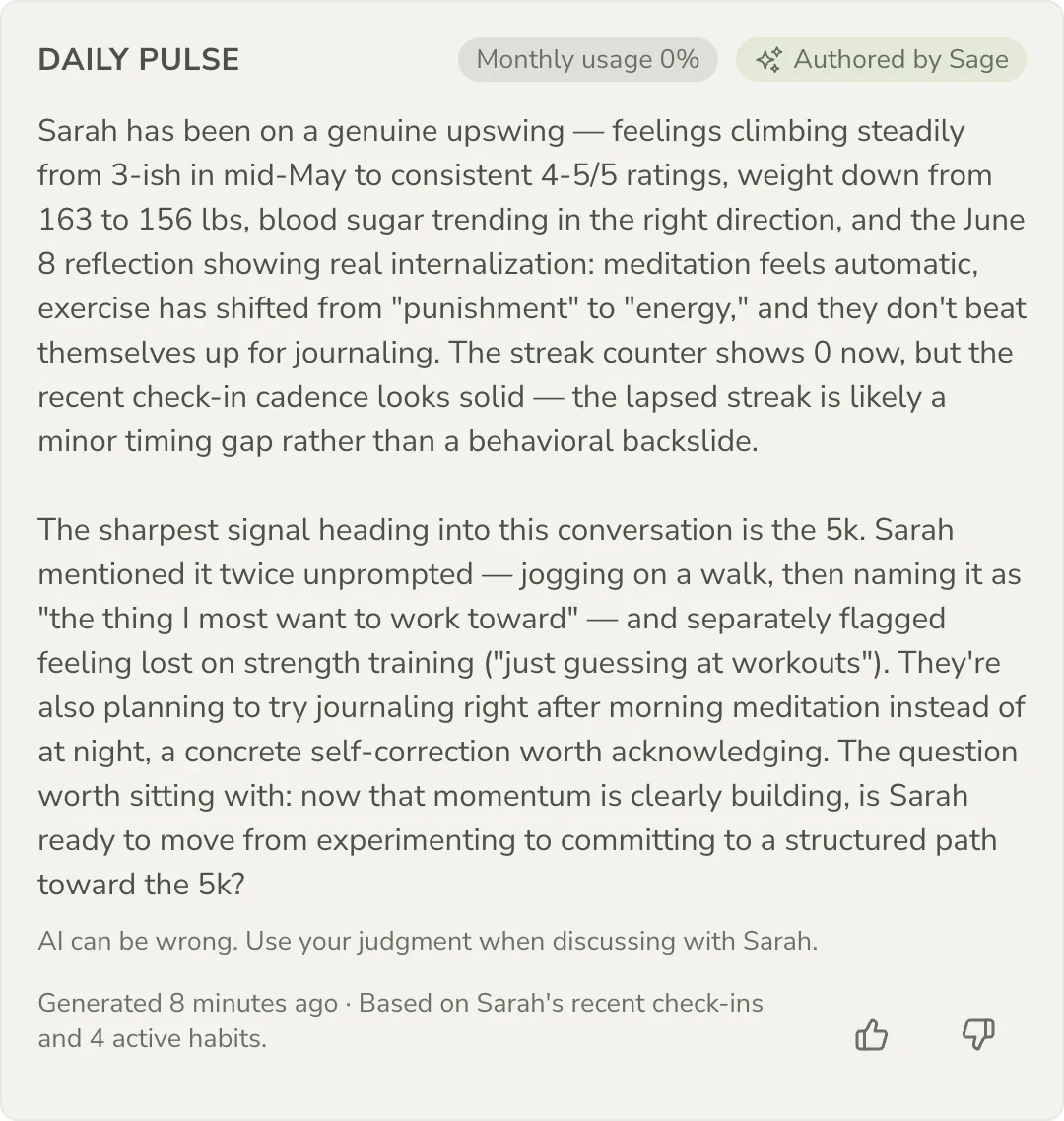
Start each morning with your Daily Pulse. On Grove Home, the From Sage card holds Sage’s overnight read across your roster; click a client there, or open any client’s page, to find their Daily Pulse card. It carries an Authored by Sage badge and the reminder “AI can be wrong. Use your judgment when discussing with [client],” right on the card. This is Sage’s short read on what changed since the last check-in, before you ever open a session.
-
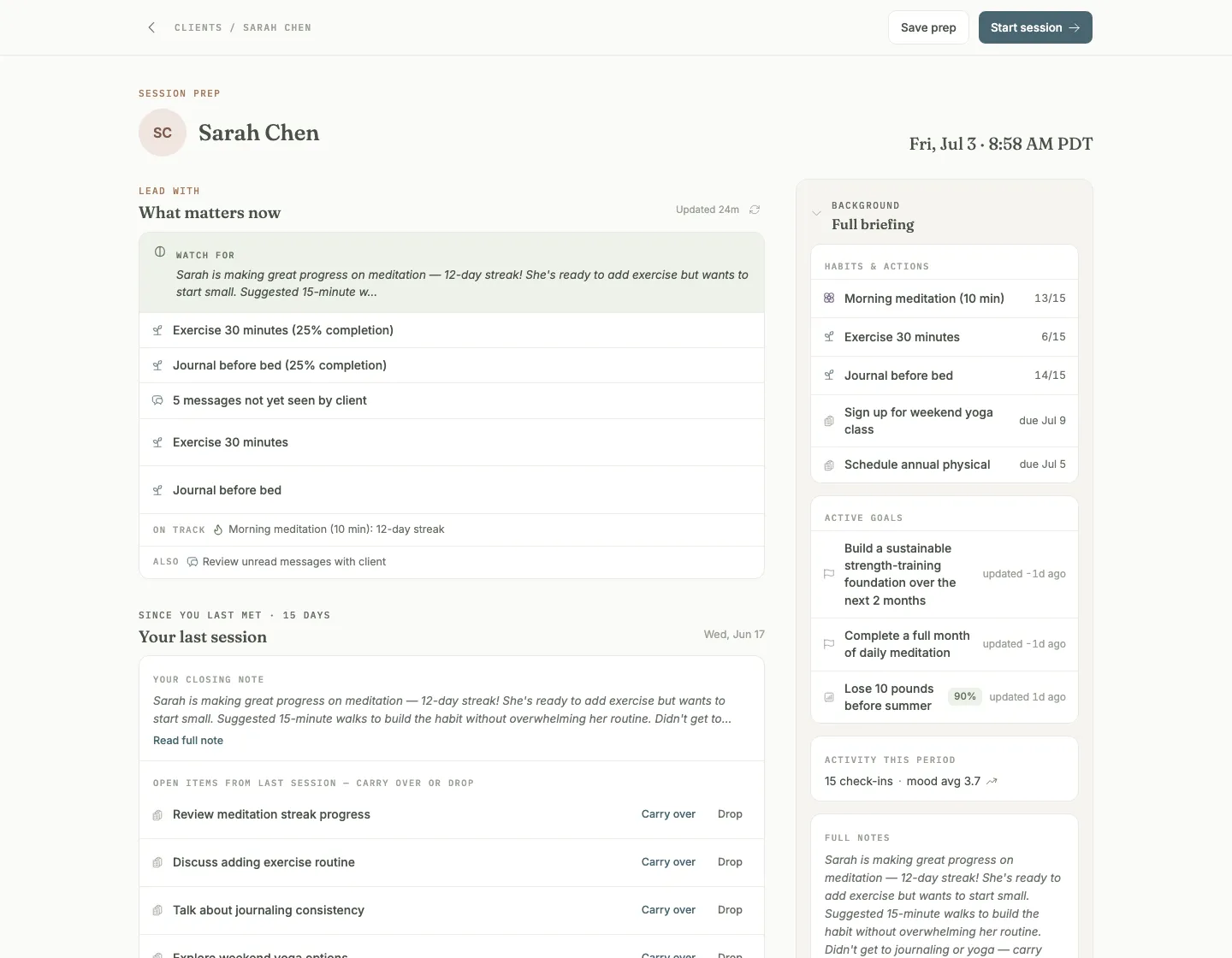
Open session prep from your Schedule. On the Schedule page, find the upcoming session and click Prep (or click the Prep chip on that session in Grove Home’s Today’s Sessions card). Grove opens the full prep view for that client, with Save prep and Start session waiting in the top bar the moment you’re ready to move on.
-
Lead with what matters now. The first section, Lead with · What matters now, opens with a Watch for band pulled straight from your closing note on the last session, then lists the signals worth leading with: tender habits, mood changes, unread messages, stalled goals. Click the refresh icon to recalculate it against the latest data.
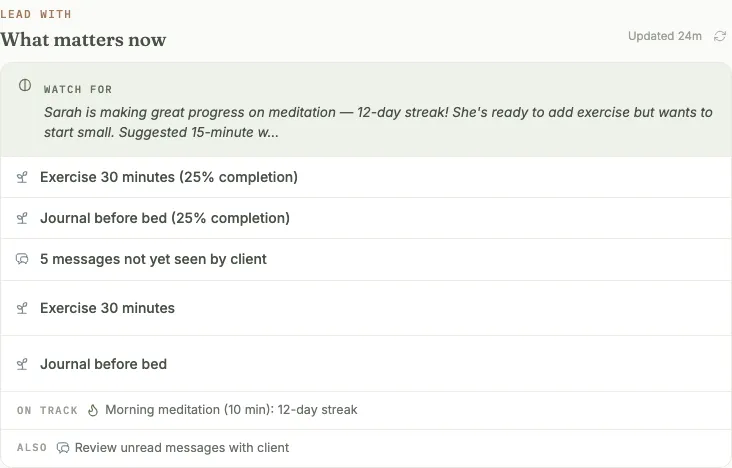
Heads up: this panel and the one below it only ever show activity since your last session with this client, not their whole history. Older activity stays out of the way so the briefing never gets crowded.
-
Review since you last met. The next section recaps your last session: your closing note (click Read full note for the full text) and any open items you left there, each with Carry over or Drop next to it. Carrying one over adds it straight to today’s agenda tagged Carryover.
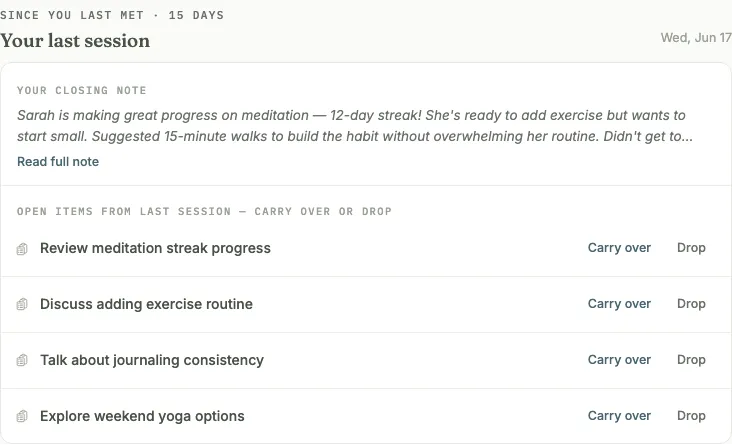
Gotcha: every agenda item is tagged by where it came from, Manual, Carryover, or Suggestion, so you can always tell what you chose from what the client or Sage raised. See where agenda items come from.
-
Add Sage’s suggested moves. Suggested moves · What you could do turns your Talking Points into one-click agenda material, drafted from the client’s recent check-ins and your notes and marked with the Authored by Sage badge. Click Add on anything worth discussing, or Dismiss to clear it from this session. The refresh icon regenerates the list; it never refreshes on its own, so a new check-in overnight won’t reshuffle an agenda you’re already building.
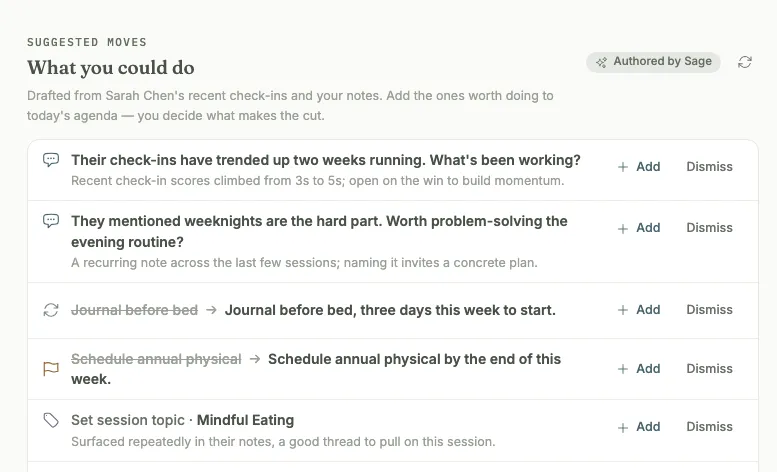
Gotcha: dismissing a suggested move only hides it for this session. It can resurface later if the same signal is still relevant. See what happens when I dismiss a suggested move.
Tip: the notes behind this prep live on the client’s Notes tab, the running record you keep between sessions: quick thoughts typed anytime, photographed notebook pages, imported transcripts. Prep shows your latest between-session notes right beside the agenda, so anything you jotted since the last session is already in front of you. See the client notes feature and what Sage reads from your notes.
-
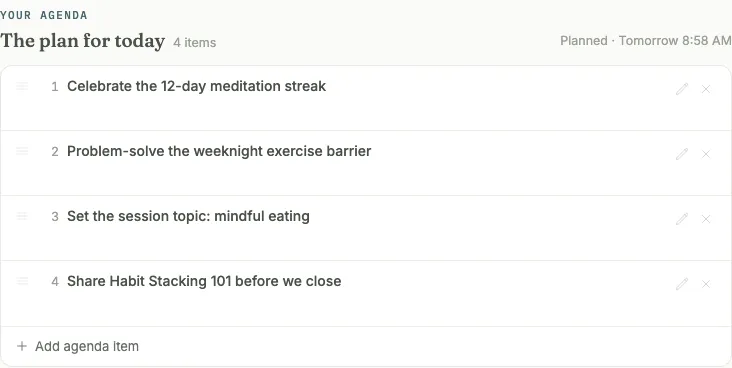
Build your agenda. Everything you carried over or added lands in Your agenda · The plan for today, in the order you’ll cover it. Drag items to reorder, click a title to edit it, or add a private note only you can see. An item you don’t want here anymore can be set aside before the session even starts.
-
Save your prep, or start the session when you’re ready. Click Save prep any time to hold your work for later, or Start session to begin. Everything you built (agenda, prep notes, carried-over items) carries straight into the live session.
-
Lock in your plan once the session wraps. During the live session, click Lock In Plan. The confirmation screen lists exactly what will be committed (new habits and actions, modified items, the topic, anything set aside) before you click Confirm & Lock In. If a topic is assigned, Grove notifies your client with the session’s topic and reflection question the moment you confirm.
Gotcha: lock-in is a permanent commit. You can still edit habits or actions directly from the client’s profile afterward, but the session itself can’t be reopened. See can I undo a session lock-in? Anything you set aside instead of checking off carries forward automatically as a Carryover item next time; see what does “set aside” mean.
-
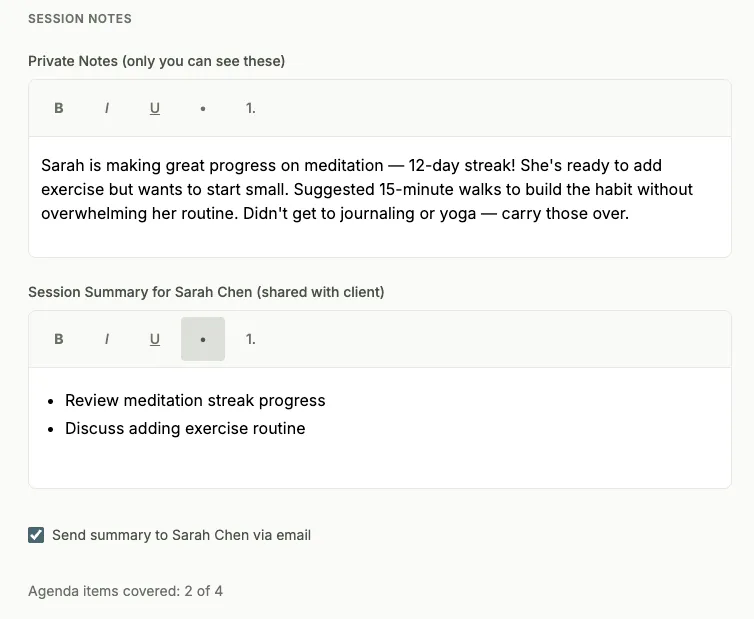
Add session notes. Click Add Session Notes. Private Notes (only you can see these) are yours alone; the Session Summary (shared with client) is what your client will read, and checking Send summary via email delivers it the moment you click Save & Complete.
-
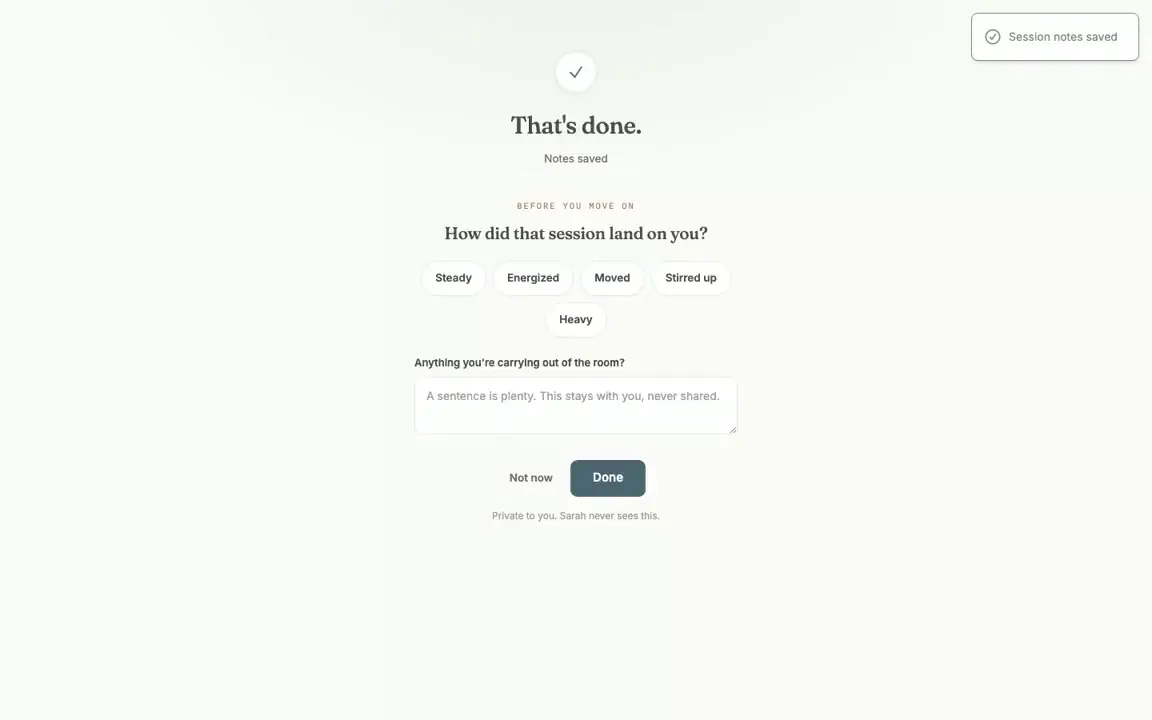
Close with your own reflection. Grove asks privately how the session landed on you (Steady, Energized, Moved, Stirred up, or Heavy) and offers a line for anything you’re carrying out of the room. It’s always skippable with Not now, and whatever you write stays private. Your client never sees this.
How this ritual supports NBHWC best practices
Session preparation is not just a nice habit; it is a named competency in the NBHWC Content Outline (2026-2030), section 1.4 of “Coaching Presence, Relationships, and Sessions.” The outline breaks it into three practices: review available client materials, establish logistics and appropriate onboarding, and engage in a mindful or grounding practice before the session. The ritual in this guide is built so that following it means practicing those standards before every session, not just on the weeks you have spare energy.
-
Review available client materials (1.4.1). The Daily Pulse and the prep view are this practice made routine. Every check-in, habit, message, and note since your last session is gathered into one briefing, so reviewing client materials no longer depends on how much time you found that morning.
-
Use a strengths-based mindset, focusing on the person, not the problem (1.4.1.1). What matters now surfaces wins to celebrate alongside tender habits and stalled goals, and Sage’s suggested moves include celebrations and reframes, not just concerns. You build the agenda around the person’s whole week, not a problem list.
-
Recognize the limitations of client materials (1.4.1.2). Grove is explicit about what its materials can and cannot tell you. Everything Sage drafts carries the Authored by Sage badge and the reminder that AI can be wrong. The briefing covers only activity since your last session, and nothing reaches your agenda unless you add it. Check-ins show what a client chose to log; you bring the context around cultural norms, family history, and significant life events that no summary can hold.
-
Make arrangements with a safe, confidential environment in mind (1.4.2, 1.4.2.1). Grove keeps a hard line between what is yours and what is shared. Prep notes, Private Notes on the session, and your closing reflection are never visible to the client, and the Session Summary is shared only when you choose to send it. Sage reads only clients who have explicitly opted in, so the materials you review exist with the client’s consent.
-
Eliminate distractions for coach and client (1.4.2.3). The prep view exists so the minutes before a call are not spent scrolling back through a week of messages. Suggested moves never refresh on their own, so an overnight check-in cannot reshuffle an agenda mid-thought. And because clients check in on their own schedule, the session itself stays a conversation instead of doubling as data collection.
-
Engage in a mindful or grounding practice prior to the session (1.4.3). No tool can do this one for you, and Grove does not pretend to. What it does is protect room for it: with your prep saved the day before, or done in ten focused minutes, the moments before Start session are yours for grounding instead of scrambling. The private reflection at the close (step 10) works the same way from the other side: naming how a session landed and what you are carrying lets you set it down, so you arrive at the next one grounded in this client’s hour, not still holding the last one.
What’s next
Once this ritual feels automatic, close the loop on the other side of it: see session reflection for what your own reflections build into over time, and the Sage feature page for how the Daily Pulse and Talking Points you leaned on here draw from the same monthly AI budget across your whole roster.