If you run anything like a structured program (a stress reset, a movement foundation, a 12-week progression), typing the same habits and check-in cadence into each new client’s profile is where consistency quietly falls apart. By client number five you’re copying from notes you wrote two months ago; by client number ten you’ve lost track of which version of the program you’re actually running.
Grove playbooks fix that: build the program once as a reusable bundle of habits, actions, agenda items, topics, and resources, then assign it to as many clients as you want. Each assignment creates its own independent copy, so editing the library version never disturbs a client already mid-program, and each client’s copy activates on their own timeline, not the day you wrote it.
This guide walks the whole arc: building a playbook, grouping it into phases, assigning it to a client, and activating it so the client actually sees the plan. Because phased programs line up with the goal-setting and behavior-change competencies coaches train on, there’s a section at the end mapping the two. If you haven’t set up habits and goals for a client yet, Build habits and goals that stick covers that layer first; a playbook is really just a way to assemble and reuse that same layer of items at scale.
The terms you’ll see
A few words carry precise meanings in this flow. Here’s the map:
| Term | What it means |
|---|---|
| Playbook | A reusable program: a named bundle of entries you build once in your library and assign to any client. |
| Entry | One item inside a playbook. A Habit or Action becomes ongoing work for the client; an Agenda item, Topic, or Resource feeds your sessions instead. |
| Phase | A named section of entries (“Week 1”) you activate as a unit, one phase at a time or all at once. |
| Library | Your reusable catalog on the Playbooks page. Nothing in it is visible to any client. |
| Assigned copy | The independent copy Grove creates when you assign a playbook to a client. Edits to the library version never change it, and edits to it never change the library version. |
| Draft | An assigned copy before you’ve activated anything. The client sees nothing yet. |
| Active | The copy’s status once you activate the first entry; it flips automatically. |
| Future | Where activated habits and actions land on the client: staged and proposed for the next session’s agenda, ready to introduce in conversation. |
| Completed | The status the whole playbook reaches on its own once every entry hits its completion criteria. |
Before you start
- Have the program’s shape roughly in mind: which habits, actions, or topics belong together, and whether they naturally break into phases (Week 1, Week 2, and so on) or work fine as one flat list.
- If you’re assigning to a client today, make sure they already exist in Grove. Phases or entries that include a topic or a resource need that client to have a session already scheduled before you can turn them on.
- Budget fifteen to twenty minutes to build a first program; assigning it to each new client afterward takes under a minute.
Steps
-
Open your library. Click Playbooks in the sidebar nav. This is your reusable catalog: every program you’ve built or cloned lives here, separate from any one client, so a new client never sees anything until you assign it.
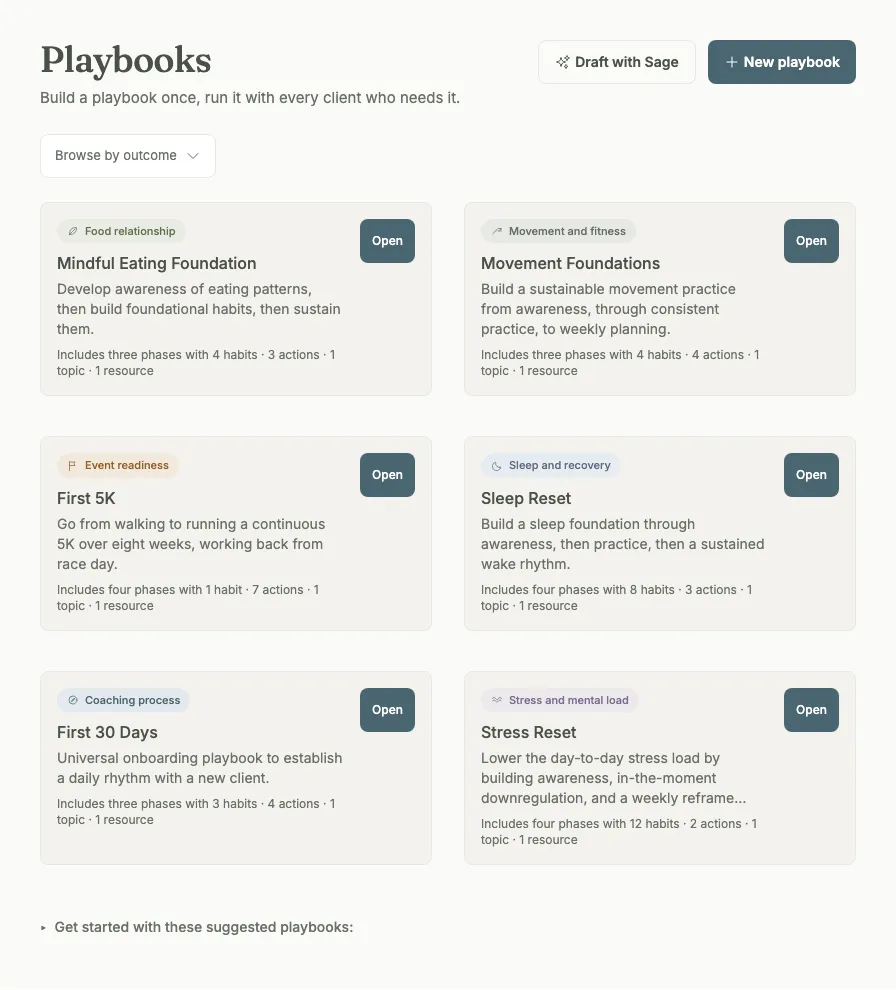
Tip: Don’t want to start from a blank page? Scroll down for Get started with these suggested playbooks, a set of ready-made programs Grove ships. Click + Add on one to clone it straight into your library, then customize it like anything you built yourself.
-
Start a new playbook. Click New playbook. An empty drawer opens in edit mode with a name field, an optional description, and an entries list below. You don’t have to name it first: start adding entries right away if that’s how you think, and name it whenever it’s convenient.
Tip: Grove only saves the playbook once you do something real: add your first entry, or type a name. If you open the drawer and close it again without touching either, nothing is left behind in your library.
-
Add entries. Click + Add entry, pick a type (Habit, Action, Agenda item, Topic, or Resource), and fill in the text. Everything saves as you go (there’s no separate save step), so you can add a handful of entries, step away, and come back to exactly where you left off.
Tip: Habits and actions are the two entry types that turn into ongoing work for the client (a repeating habit, a one-time action). Agenda items, topics, and resources are session-facing: they show up in your session prep rather than the client’s daily list.
-
Group entries into phases. Click + Add phase, name it something like “Week 1,” and drag entries into it (or add new entries directly inside it). Phases give the program a sequence (Week 1 before Week 2, foundations before the harder asks) instead of one long undifferentiated list.
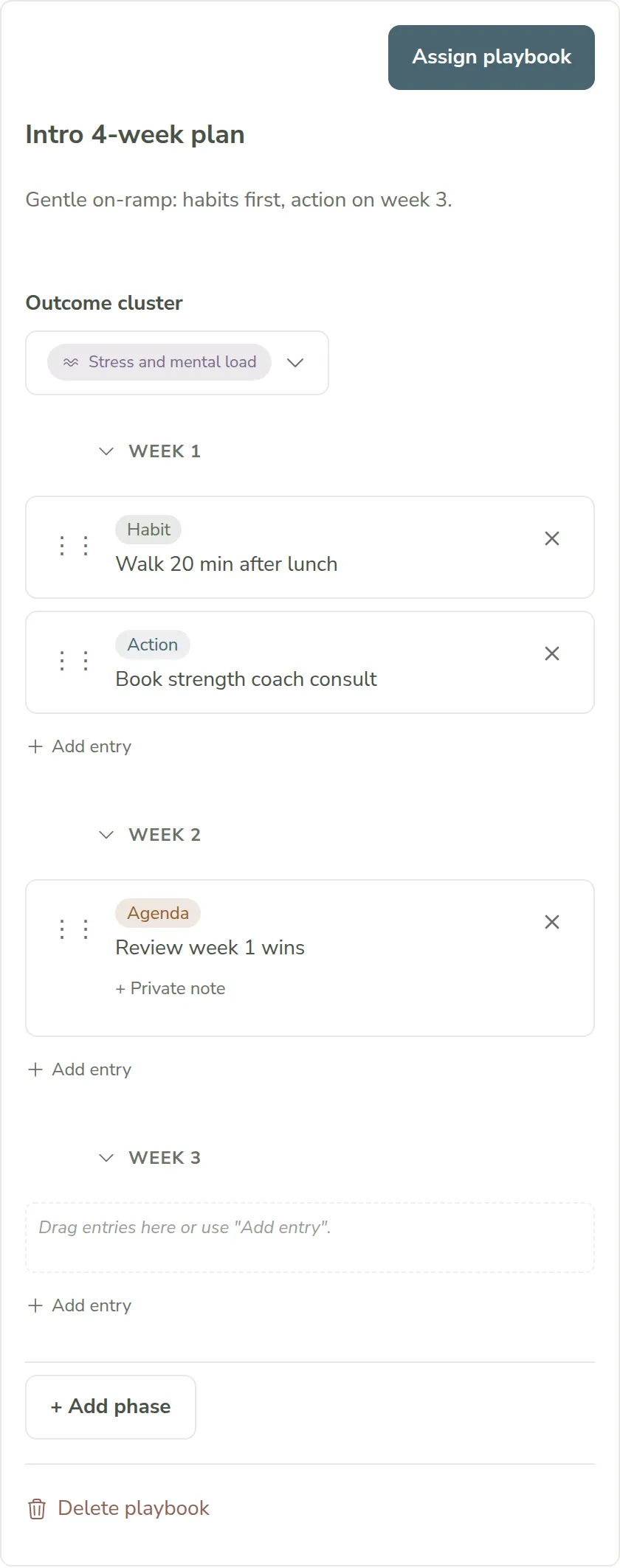
Gotcha: A phase can hold at most one topic (the entry form greys the option out with “Only one topic per phase”). Activating a phase assigns its topic to the client’s next session, and a session has one topic focus at a time, so a second topic has nowhere to go. Give it its own phase instead. Dragging a topic onto a phase that already has one shows the same rule instead of just snapping back: the drop target won’t highlight, and if you drop anyway, Grove tells you why.
-
Assign it to a client. Click Assign playbook in the drawer. In the Use playbook with a client dialog, search for and select the client (or several at once), optionally rename what they’ll see, and click Assign. Grove creates an independent copy on that client right away. It starts in Draft, so nothing changes for them yet.
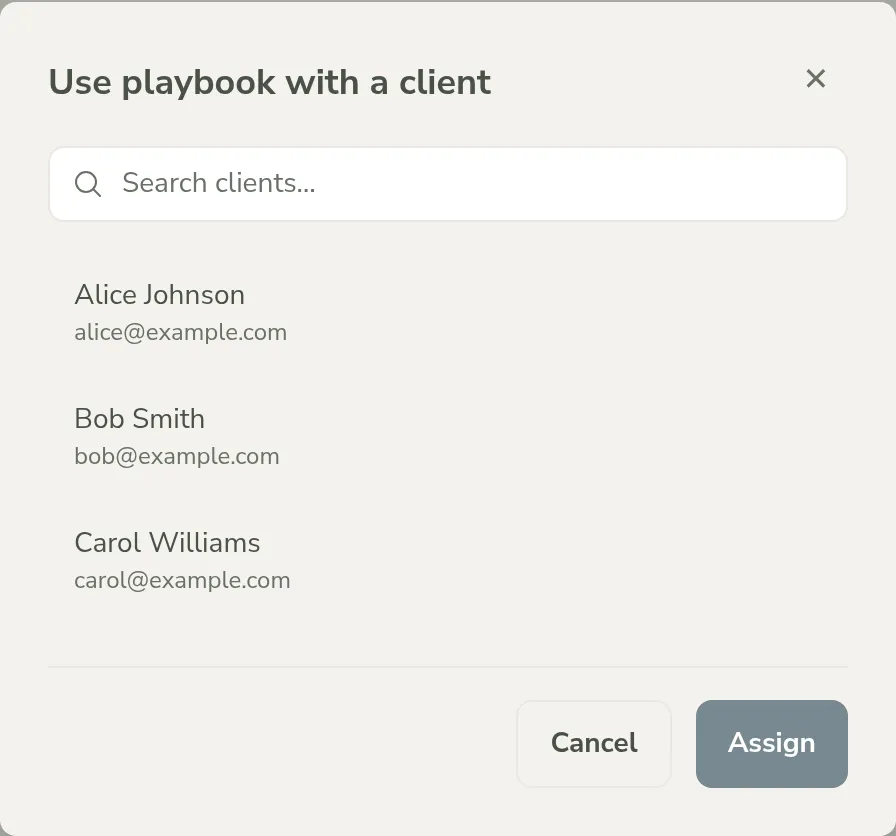
Tip: Working from a client’s own profile instead? Open their Playbooks section and click Assign playbook there to browse your library and assign from that side; it’s the same result either way.
-
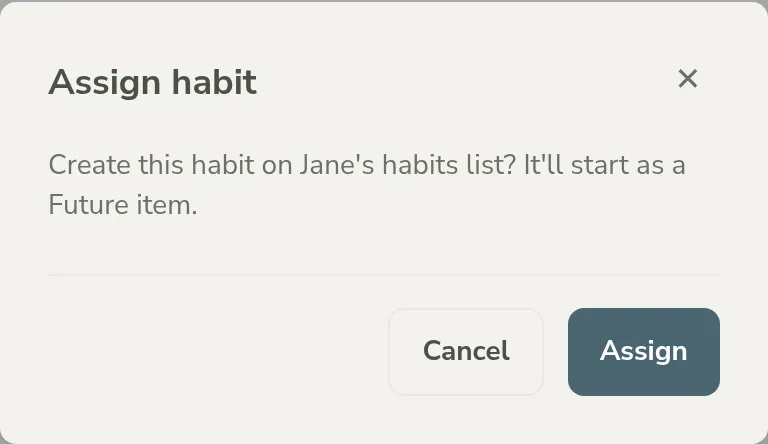
Activate the first phase (or the whole thing). Open the client’s copy and click Activate first phase (or Activate playbook if you didn’t use phases). Habits and actions in that phase land on the client as Future items and get proposed on their next session’s agenda; topics and resources attach to their next scheduled session.
Heads up: If a phase includes a topic or resource and the client has no session on the books yet, Grove blocks activation with Schedule a session first instead of silently skipping it. Click the Schedule session button right in that dialog to book one without leaving the page, then activate.
Tip: Prefer to bring entries in one at a time instead of a whole phase at once? Each entry row has its own play icon (tooltip: Activate); clicking it confirms the same landing state before it’s created.
-
Watch it land in session prep. Before that next session, open the client’s prep view. Habits and actions you activated show up in the Future Habits & Actions card, each one tagged “from” the playbook it came from, so you (and later, the client) can see exactly which program produced it.
-
Activate the next phase when the client’s ready. When the pacing is right, come back to the client’s playbook, hover the Week 2 phase header for its play icon (tooltip: Activate phase Week 2), and confirm in the dialog that opens (Activate Week 2). There’s no fixed timer forcing you to move on before the client has actually landed the first phase. Once every entry in the playbook has hit its completion criteria (a habit marked Active, an action completed, a session held), the whole playbook flips to Completed on its own.
How phased programs support NBHWC best practices
A reusable program can sound like the opposite of client-centered coaching: one plan, many people. The playbook lifecycle is built so that scaling your method still practices the competencies in the NBHWC Content Outline (2026-2030), not shortcuts around them.
-
Pacing stays aligned with the person (3.9.2.1). The outline asks coaches to align goals and actions with the client’s own pace, interests, and values. Phases activate when you and your client decide, not on a calendar the template set, and each assignment is an independent copy, so one client moving faster never drags another’s plan along.
-
Outcome goals become behavioral steps (3.9.3). Translating an outcome into repeatable behavior is the outline’s competency 3.9.3, and a playbook is that translation made reusable: the habits and actions inside each phase are the behavioral dose, sequenced so foundations come before harder asks.
-
Staged introduction respects readiness (2.2). The outline’s theory domain includes the Transtheoretical Model, where interventions match the client’s stage of change. Phase-by-phase activation is that principle in the product: introduce the next layer in conversation when the client has landed the last one, instead of dropping the whole program on day one.
-
The program feeds session preparation (1.4). Reviewing client materials before a session is competency 1.4.1. Activated habits and actions surface in your session-prep briefing tagged with the program they came from, and topics and resources attach themselves to the next scheduled session, so the plan and the session never drift apart.
None of this replaces your judgment about what a particular client needs next. It makes the well-paced, client-by-client version of running a program the path of least resistance, at ten clients as much as at one.
What’s next
A playbook is only as good as what happens once its habits and actions actually land on a client. See Build habits and goals that stick for how Future, Active, Rooted, and Archived fit together on the items your program produces. And because activated topics and resources feed straight into the next scheduled session, Show up prepared: session prep with Sage covers what that briefing looks like once the program is running.