
A few years ago, at a previous company, I designed and ran an AI enablement program for engineers, which is a fancy way of saying I helped all of the engineers at a company use AI more effectively. The tools were the easy part. The hard part was watching capable people open a chatbot, type one clever question, get a bland, generic answer, and quietly decide the whole thing was overhyped. The ones who got real value did something unglamorous: they stopped starting from scratch every time. Instead of hunting for the perfect question, they gave the AI the background it needed, who they were, what they were working on, the specifics of the actual problem, and let it work from there. Less like a search box, more like a capable new assistant on their first day. An AI that knows your situation beats a clever question, every time.
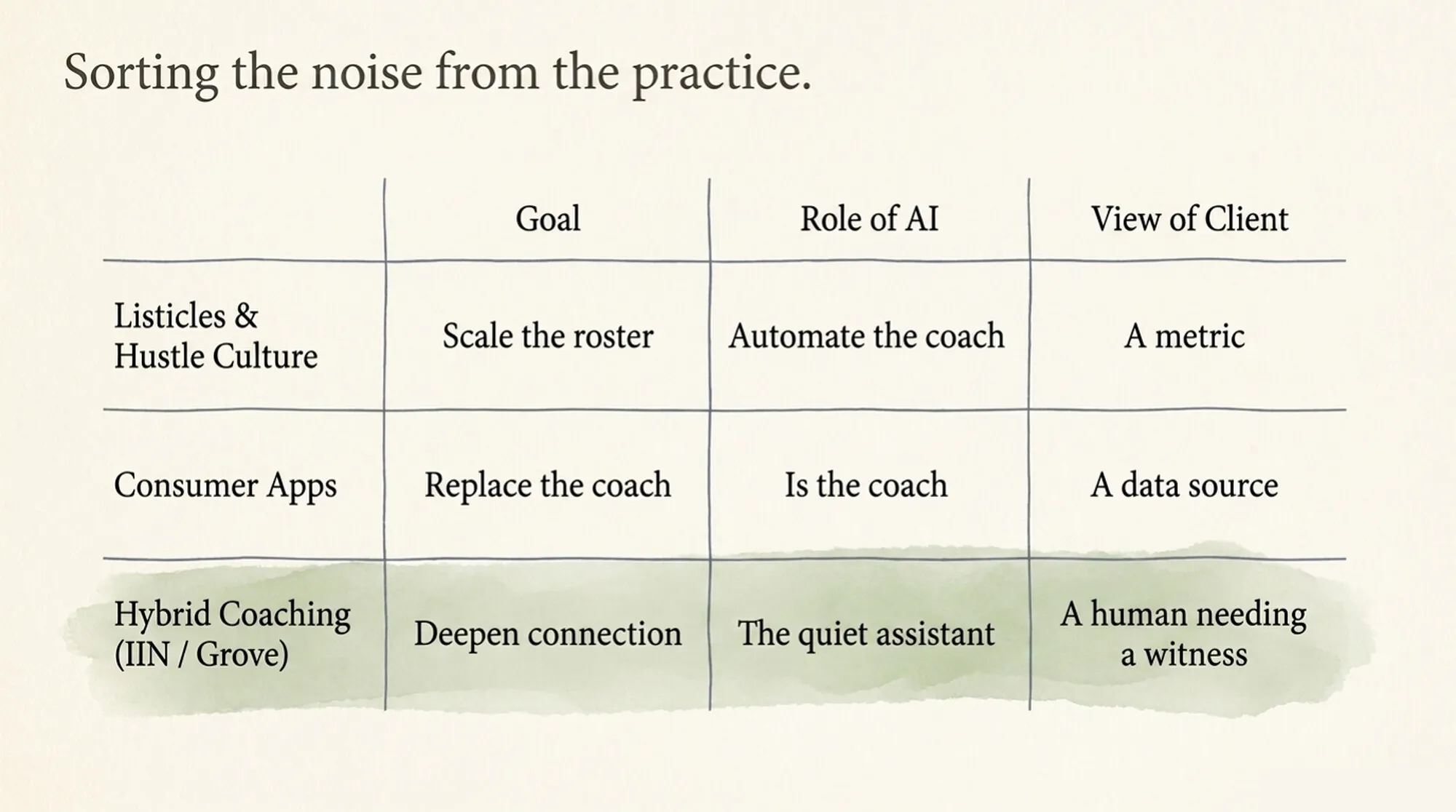
That lesson is the whole trick, and almost nothing written for coaches teaches it. Search “AI tools for health coaches” and the first page splits into two piles. Pile one is listicles. Nine tools to scale your client roster. Twelve free apps that save you ten hours a week. The same meal-plan generators and note summarizers, reshuffled into a slightly different ranking each time. Pile two is consumer apps that are themselves the coach: an AI in your pocket that will nudge you toward 12k steps and never once ask about the week underneath them.
Neither pile answers the question a working coach is actually holding. The listicles assume the goal is more clients and less time per client. The consumer apps assume the human is optional. Whether the human is optional is its own question, and I wrote a companion piece answering it: Will AI Replace Health Coaches? I Built Mine to Find Out. The short version: the coaching stays yours. This piece is the other half. What AI is genuinely good at in the practice around the coaching, laid out as a system you can work through rather than a list you skim.
The three jobs, and the one this piece is for
IIN’s 2026 guide for coaches sorts the useful side of AI into three jobs, and its framing for the coach’s posture is one worth adopting: literacy without dependence. Know these tools well enough to use them with judgment, without handing them the parts of the work only you can do.
The first job is sharpening your own craft: role-playing the difficult conversation before Thursday’s session, pressure-testing a behavior-change plan against a framework you are still learning. The second is helping clients inside your scope, drafting journaling prompts and habit templates, with the guardrail every credentialing body draws: no medical advice, no diagnosis, nothing that pretends the tool has clinical judgment. Inside those lines, AI is a background instrument. Outside them, it is a liability wearing a friendly interface.
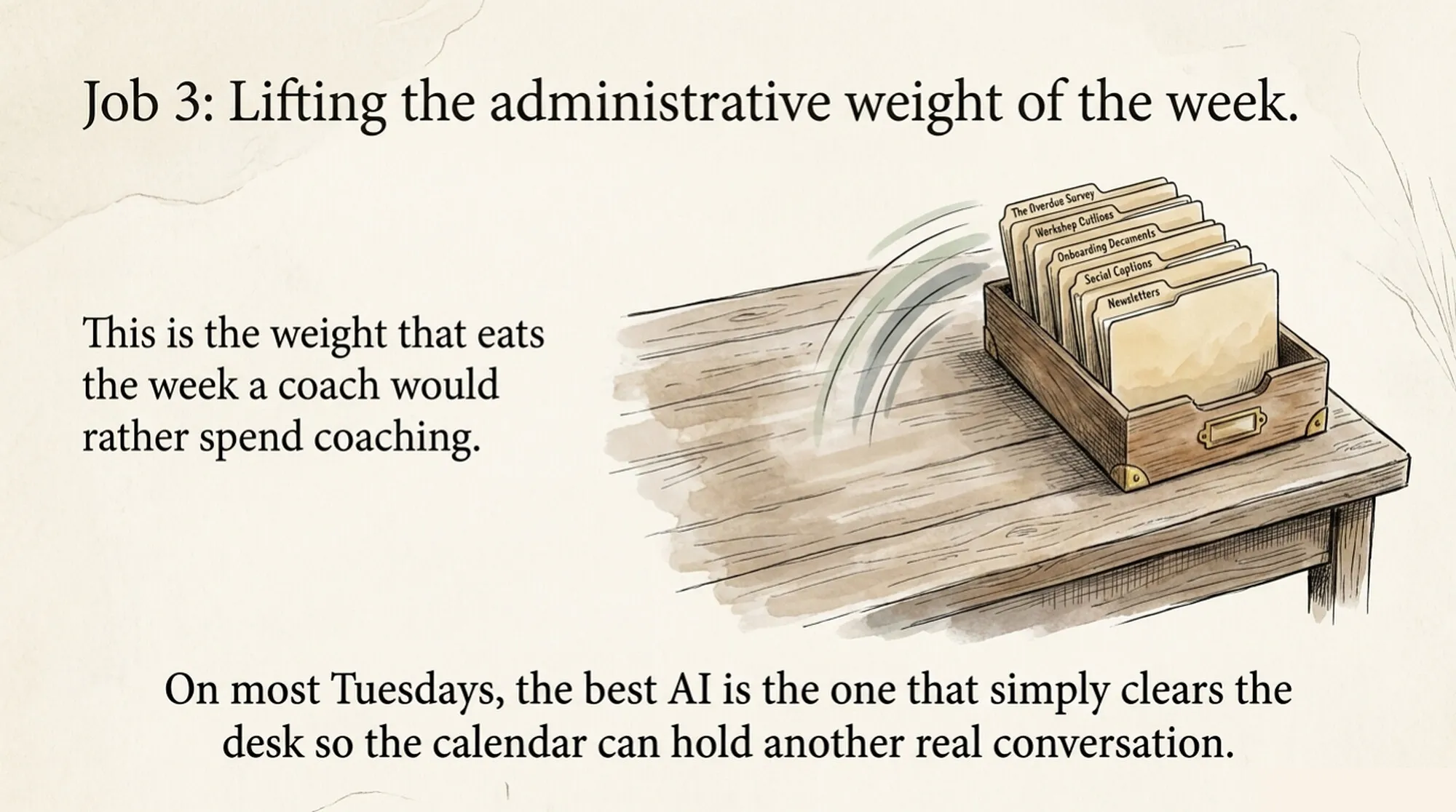
The third job is running the business. It is the one the listicles are actually about, the administrative weight that eats the week a coach would rather spend coaching, and it is where AI genuinely earns its keep. It is also where a system beats a tool list. Here is the one I would set up.
Start with one project, not a hundred prompts
Claude and ChatGPT both let you create a project: a workspace with standing instructions and files the model reads every time you talk to it. Both publish short setup guides, here is Anthropic’s and here is OpenAI’s. This is the single most useful AI move available to a solo business, and it takes about fifteen minutes. Create one project for your practice and feed it five things:
- Who you serve, in your own words. Your niche, the person you picture when you write, what they are usually struggling with when they find you.
- Your offers and prices. Package names, session counts, what is included, what is not.
- Two or three pieces of your writing you actually like. A newsletter, an about page, a long email to a friend. This is how it learns your voice instead of the internet’s.
- Your scope of practice. Which board or school you trained with and a summary of what you do and do not do. Tell the project to flag anything that drifts toward medical advice.
- This quarter’s one business goal. Fill the Tuesday group program, launch the corporate workshop, whatever it is.
Now every draft starts from your practice instead of from the average of the internet, and you stop re-explaining yourself in every chat. When something changes, change the file once.
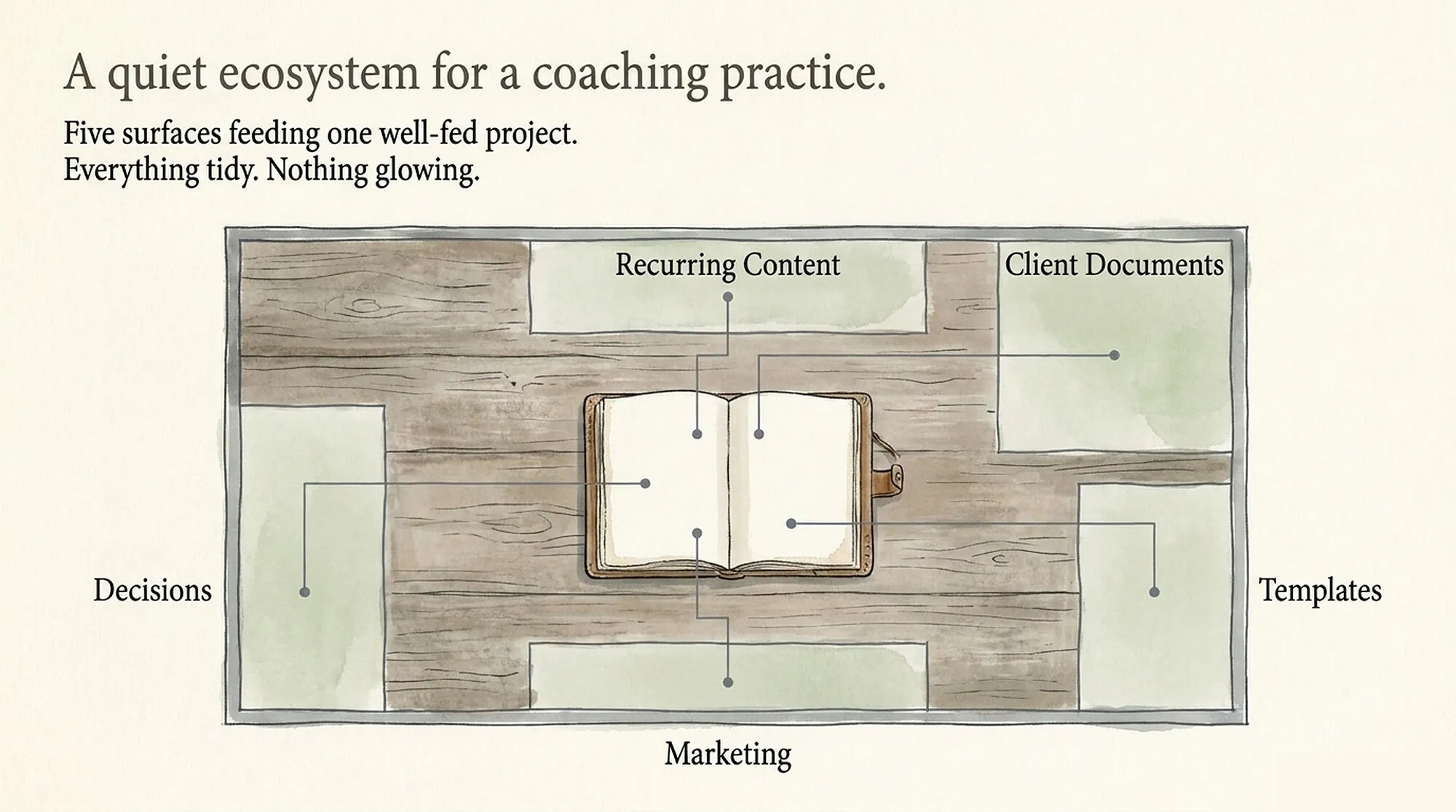
The five surfaces, one per week
Work through these in order, one per week. Each one names what to hand off, what to keep by hand, and a starter prompt you can paste straight into your project. The starters are deliberately plain: run one, see what comes back, then edit it until it sounds like you asked it. The edits are the point; that is where it becomes yours. And when you are ready for advanced mode, Anthropic and OpenAI both publish their own prompting guides.
1. Recurring content. The newsletter, the posts, the emails that go out whether or not you have energy that week. Hand the project the point you want to make and the true story it came from, and ask for a draft in your voice, using the samples you fed it. Keep the stories and the opinions yours; those are the reason anyone reads a coach instead of a chatbot. And never publish a sentence you would not say out loud.
Draft this week's newsletter in my voice, using the writing samples in this
project. The point I want to make: [your point]. The true story behind it:
[two or three sentences about what actually happened]. Keep it under 500
words, end on the insight rather than a sales pitch, and flag any sentence
that does not sound like me.
2. Client-facing documents. The welcome packet, intake questions, program one-pagers, the FAQ you answer by email every month. These are one-time builds AI drafts in minutes, and they compound: every future client meets a more organized practice. Ask for a first draft from your offer description, then revise it as yourself. Keep anything that touches scope, consent, or health claims for a slow read against your certification’s code of ethics.
Draft a welcome packet for my new clients using the offers in this project.
Cover: what to expect in our first session, how sessions and check-ins work,
how to reach me between sessions, and the three questions new clients most
often ask. Keep it warm and plain, about one page, and flag anything that
drifts beyond my scope of practice.
3. Templates and systems. A session-note template. A check-in question bank. The onboarding email sequence. The workshop outline you keep rebuilding from scratch. Ask the project to draft the structure, then spend your time tuning the questions you would actually ask. A mediocre template you refine beats the perfect one you never sit down to build.
Create a session-note template I can fill in within five minutes after a
session, with sections for what we celebrated, what we worked on, what the
client committed to, and what to follow up on next time. Then draft twenty
check-in questions suited to the clients I serve, grouped by theme, so I
can rotate them instead of reusing the same three.
4. Marketing plumbing. Website copy, your bio in three lengths, the description for your directory listings, the blurb the podcast host asks for an hour before recording. Low-stakes, high-friction writing that AI does well precisely because it is not the writing your business depends on. Draft it, fix the two sentences that do not sound like you, ship it.
Using my writing samples and who I serve, write my bio in three lengths:
50 words for directory listings, 100 words for podcast introductions, and
250 words for my website. Keep my credentials exactly as written in this
project, skip the hype, and give me two versions of each.
5. Decisions. Pricing, niche, whether to build the group program. This is the surface where the tools are most dangerous, because they agree with you by default. Float a shaky pricing idea and most of them will hand you three reasons it is brilliant. So never ask “is this a good plan.” Ask it to argue against the plan. Ask what a skeptical colleague would say, what would have to be true for the opposite choice to be right, which assumption would hurt most if it were wrong. As a thinking partner it is genuinely useful. As a cheerleader it is worse than nothing.
I am considering [the decision, in one sentence]. Do not tell me whether it
is a good idea. First, argue against it: give me the three strongest reasons
it could fail. Then tell me what a skeptical colleague would ask, and which
of my assumptions would hurt most if it turned out wrong. Only after all of
that, tell me what would have to be true for it to work.
The two hard lines
First: no identifiable client information goes into a general-purpose AI tool. Not session notes with a name on them, not a screenshot of a check-in, not “let me tell you about my client Sarah.” These tools were not built to hold confidential health information, and every credentialing body’s confidentiality standard applies to what you paste into a chat just as much as what you file in a drawer. If a task needs client specifics, strip them or do not hand it off.
Second: nothing ships without your judgment. The draft is the machine’s. The decision to send it, the claim it makes, the advice it implies: those are yours, and your name is on all of it.
What this buys
Five surfaces, five weeks, one project doing the remembering. What you get back is not really the hours, though the hours are real. It is that the business stops competing with the coaching for the same finite attention. The client side of the week deserves the same care, and that is the half we are building Grove for: Sage reads the check-ins and drafts the session prep, and the coach stays the one who decides what matters.
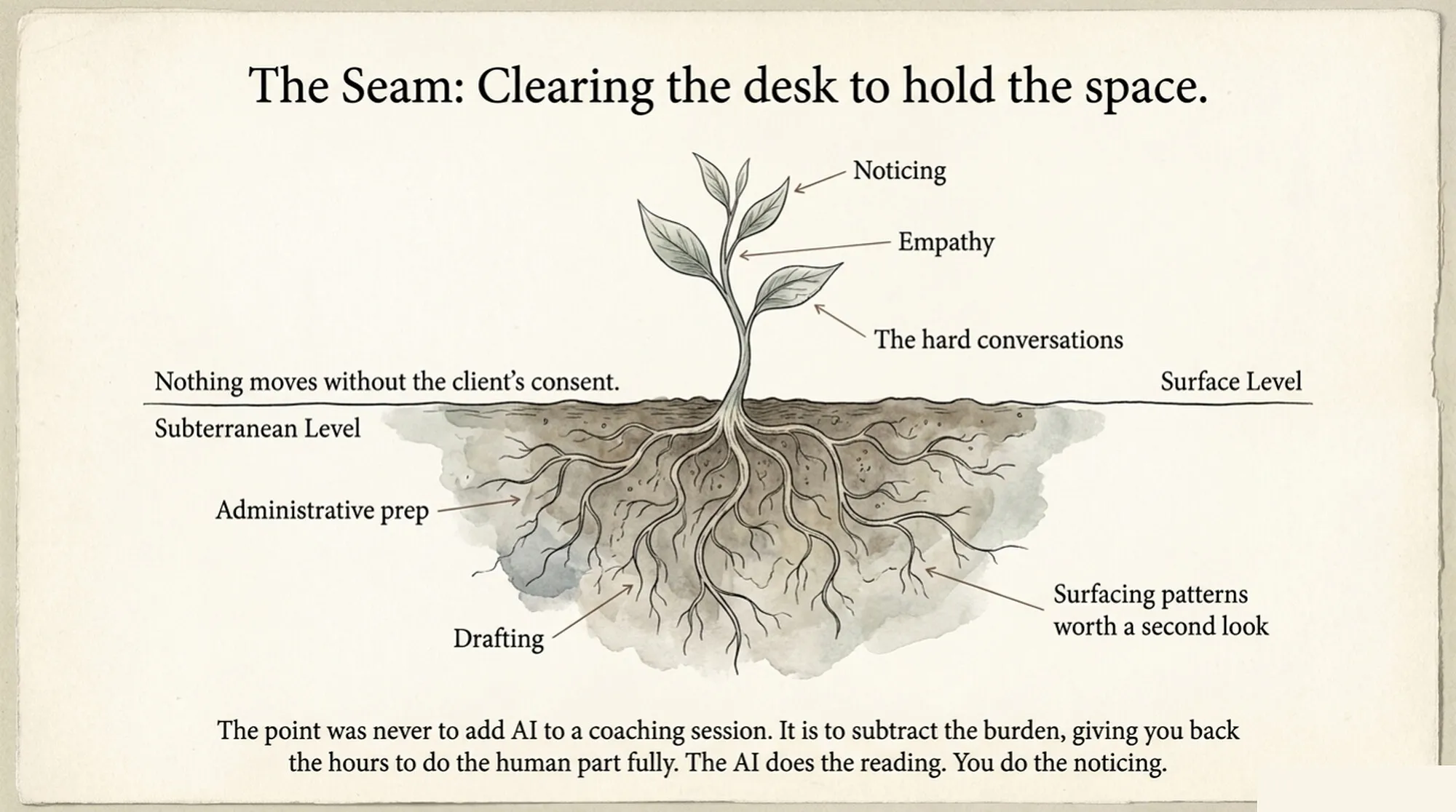
The tools will keep changing. There will be a new nine-best list next quarter and a shinier model the quarter after. The system holds still. The best AI tool for a health coach, on most Tuesdays, is the one that clears the desk so the calendar can hold one more real conversation.

Founder of Grove. Twenty years building software for skilled professionals. Currently writes mostly on Tuesdays from a small studio in Austin.