
Notifications your client actually controls
Every reminder Grove sends works over push and email, and your client decides which channel for each kind. Coach messages, session prep, daily check-ins, weekly nudges: push, email, or both. A global pause and a nightly Quiet Hours window keep them reachable without getting buzzed at the wrong time.
Try Grove →Most coaching apps send everything, everywhere, with no controls, and clients uninstall to make the buzzing stop. A notification is supposed to bring a client back to the work, not train them to swipe it away. Grove hands every client the switches: which categories reach them, over which channel, and when the phone should stay quiet. Reminders that respect a client's evening are reminders they keep turned on.
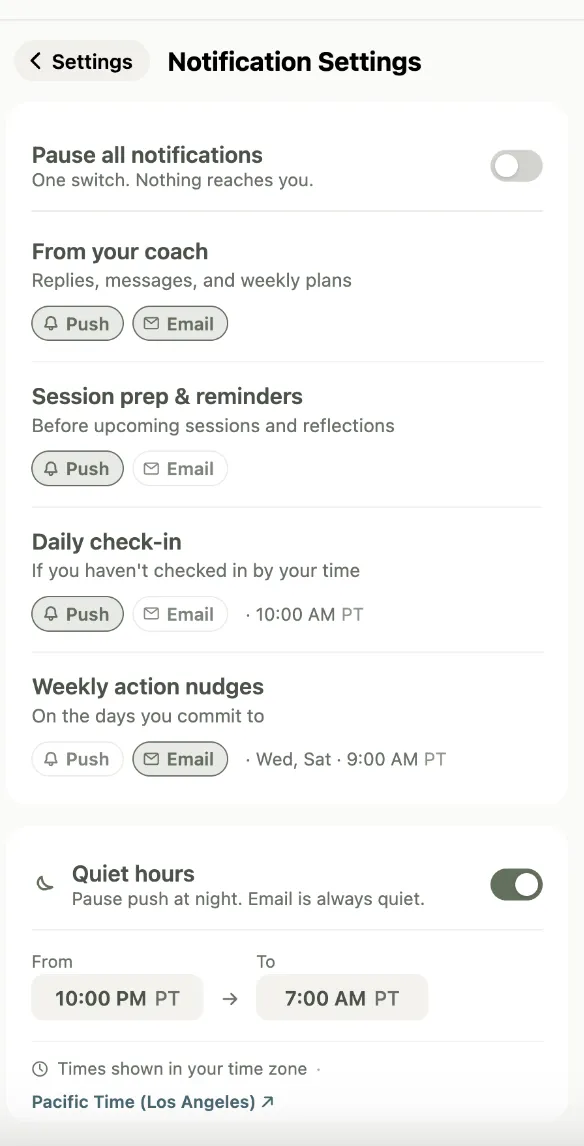
How Grove handles notifications
- Every notification Grove sends works over both push and email. When push shipped, every existing notification gained a push version the same day.
- Your client chooses push, email, or both for each category: messages from their coach, session prep and reminders, the daily check-in, and weekly action nudges.
- A nightly Quiet Hours window stops push notifications during the hours your client sets. It is evaluated in their own timezone and handles windows that cross midnight, so a reminder never lands in the middle of the night.
- One global pause silences push across every category when a client needs a break, with an optional end time so it turns itself back on.
- Tapping a push opens the app on the screen that notification is about, so your client lands in the right place instead of hunting for it.

Notification controls matter most for coaches whose clients live on their phones, where a respectful reminder keeps engagement high and a noisy one gets the whole app muted.
Common questions
Does my client have to use push notifications?
No. Every notification also works over email, and your client picks push, email, or both for each category. A client who never wants a push can turn push off entirely and still receive everything by email.
What is Quiet Hours?
A nightly window your client defines, like 9pm to 7am, when Grove will not send push notifications. It is evaluated in the client's own timezone and correctly handles a window that crosses midnight. Email is unaffected, so a client who wants a paper trail still gets one.
Can a client turn everything off for a while?
Yes. A global pause silences push across every category at once. Your client can set an end time so it resumes on its own, or leave it open-ended and switch it back on whenever they want.
Does this work on the web, or just the phone?
Push notifications are delivered to the mobile app today. Email notifications reach your client anywhere. Web push is not part of this release.
Related features
Daily check-ins
The daily check-in reminder is one of the categories your client can tune or silence.
Learn more →Client messaging
Coach messages arrive as push or email, your client's choice.
Learn more →Session reflection
Reflection prompts are one of the notification categories clients control.
Learn more →
Give your clients notifications they keep on
Start free on yourself. No clients to set up and no credit card, so you experience what your clients will before you invite anyone in.
Try Grove →